
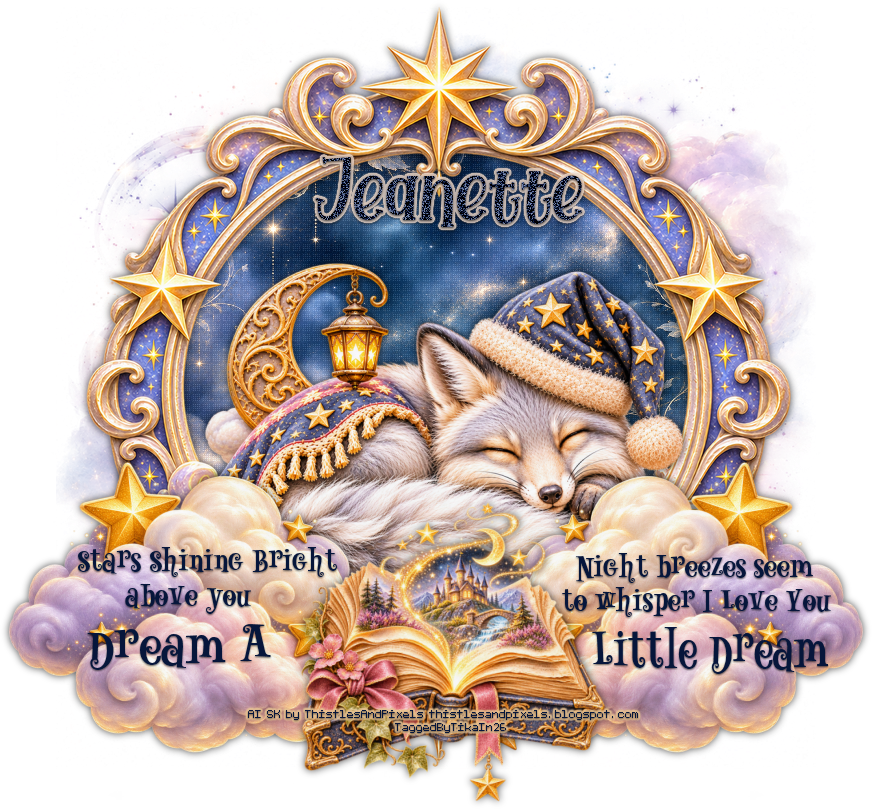
Dream A Little Dream
Written 11/14/2026
Supplies Needed:
FTU Kit Dream A Little Dream by
Thistles And Pixels. You can get this kit at her blog Thistles & Pixels
Mask is included in the kit. I am
using Mask 1
Font of your choice. I am using Cydia.
Plugins/Filters:
Penta.Com – Dot and Cross
Lets Begin:
Open frame 4 from the kit. Shift+D to
duplicate. Close the original.
Resize if you wish. Make your canvas
large enough to work with. You can crop at the end.
Using your magic wand select the
inside of the frame. Selections Modify and Expand by 5.
Layers raster layer and drag this new
layer to the bottom.
Open paper 5 and copy and paste into
selection.
Selections select none.
On the paper layer add Penta Dot and
Cross set at 30 10 12
Add a drop shadow to the frame
Open paper 11 and copy and paste as a
new layer. Drag this layer to the bottom. Apply Mask 1 from the kit. Delete the
mask layer and merge the group. Duplicate this layer and then merge the 2 mask
layers together. Resize this layer if you wish. I resized by 80%.
Open a tube of your choice from the
kit and copy and paste as a new layer. Position in the center bottom of the
frame. Add a drop shadow.
Now here is where you can make your
tag your own by adding the elements of your choice. If you want yours to look
like mine just use my tag as a reference. I will tell you the elements I used.
Elements used:
20
39
Add some wordart if you wish or
create your own like I have.
Add your name.
Add your copyright/licensing
information.
Crop and save.

No comments:
Post a Comment