Showing posts with label Punk. Show all posts

Thursday, August 4, 2016

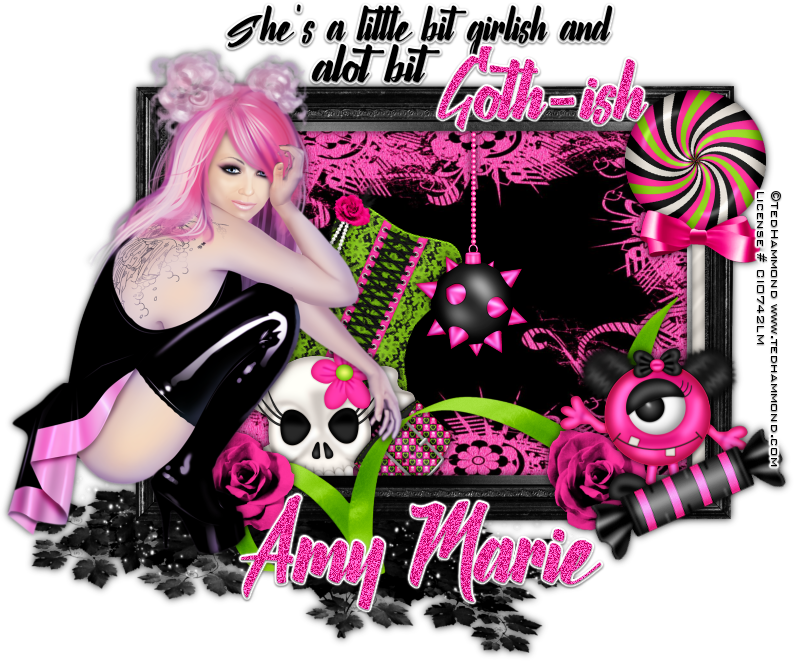
Goth-ish


Goth-ish
Written 8/4/2016
This tutorial is meant purely as a guide. Feel free to use your own choice of tube or scrap kit to make your tag unique. If you want your tag to look just like mine them use the same supplies I have used. This tutorial assumes you have a knowledge of paint shop pro. Any resemblance to any other tag or tutorial is completely coincidental.
Supplies Used:
Tube of choice. I am using an image by Ted Hammond. I purchased this image when his work was sold at CILM which is no longer in business. However you can now purchase his work at http://cdoestore.com
Scrap Kit is a little Mini Kit by Amy Marie’s Kits called Lexi. You can purchase this kit at http://amymarieskits.com/store/
Font of your choice. I am using Nalika. This is a PTU font.
Plugins:
NONE
Drop shadow used throughout:
0 0 85 11.00 black

Let's Begin:
Open F1 and shift+D to duplicate. Close the original. Image free rotate to the right 90 degrees. Make your canvas large enough to work with.
Using your magic wand select the inside of the frame. Selections modify and expand by 5. Layers new raster layer and drag under the frame. Open a paper of your choice from the kit and copy and paste into selection. Selections select none. I used paper 2.
Add a drop shadow to the frame.
Open your tube and copy and paste as a new layer. Re-size if needed so your tube is just slightly larger than the frame. Move to the far left. Add a drop shadow.
Now we are going to use some of the elements from the kit and make them look like they are inside and popping out of the frame. Use whichever elements you would like or I will the elements I used below.
Elements I used :
2
4
6
10
21
23
30
31
34
39
Add a drop shadow to all elements.
Add some text along the top if you wish.
Add your name.
Add your copyright and licensing information.

Crop and save.

Monday, June 27, 2016

Dark Night


Dark Night
Written 6/27/2016
This tutorial is meant purely as a guide. Feel free to use your own choice of tube or scrap kit to make your tag unique. If you want your tag to look just like mine them use the same supplies I have used. This tutorial assumes you have a knowledge of paint shop pro. Any resemblance to any other tag or tutorial is completely coincidental.
Supplies Used:
Tube of your choice. I am using a tube by Alex Prihodko. It is called Dark Queen. You can purchase this tube at http://picsfordesign.com
Scrap Kit is called Punk Girls by Amy Marie’s Kits. You can purchase this kit at http://amymarieskits.com/store/
Font of your choice. I am using Real Prizes. You can download it at http://www.dafont.com/realprizes.font
Plugins:
Xero Mistifier
DSB Flux Linear Transmission
Drop shadow used throughout:
0 0 100 15.00 black

Let's Begin:
Open element 84 and shift+D to duplicate. Close the original. Make your canvas large enough to work with. Using your magic wand select the inside of the frames. Selections modify and expand by 3. Open paper 10 and copy and paste as a new layer. Drag under the frame and selections invert. Hit delete. Selections select none. Using your magic wand again select the inside of only one side of the frame. Selections modify and expand by 2. Open your tube and copy and paste as a new layer. Position within the frame. Selections invert and hit delete. Selections select none. Repeat with the other frame. Change layer property to Luminance Legacy on both tubes. Merge these 2 tube layers together. Apply the Xero Mistifier plugin using the default settings. Add a drop shadow to the frame. Merge all the layers visible. Duplicate. On the bottom layer go to adjust blur Gaussian blur at 12.00. Resize this bottom layer by 105%. Apply the DSB Flux Linear Transmission plugin using the following settings:

Add noise to this layer using uniform monochrome and 25%.
Open your tube again and copy and paste as a new layer at the top. Re-size as needed. Position in the center of the frames. Apply the Xero Mistifier plugin again the same as before. Add a drop shadow.
Now let’s dress the tag up with elements from the kit. I will list the elements I used. Feel free to use other elements to make your tag unique. Placement of the elements is completely up to you. If you want your tag to look just like mine then use my tag for reference.
Elements I used:
9
36
39
40
57
77
105
108
112
126
Add your name.
Add your copyright and licensing information.
Crop and save.